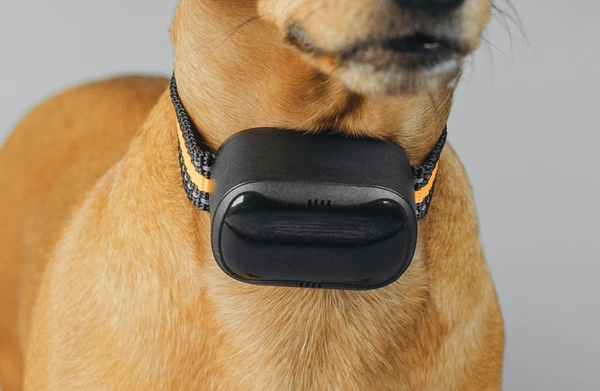
GPS collars can be powerful safety tools for dogs. They can help owners track location, set safe zones, receive escape alerts, review walk history, and feel more confident when a dog is with a sitter, walker, or family member. For dogs who bolt through doors, follow scents, chase wildlife, panic in new places, or explore too far, a GPS collar can provide information at the exact moment the owner needs it most.
But a GPS collar only works well when it is chosen, fitted, charged, tested, and used correctly. Many owners buy a tracker and assume the technology will handle everything. That is where mistakes happen. A GPS collar is not a physical fence, not a recall command, not a replacement for ID tags, and not a guarantee that a lost dog will be found instantly. It is one safety layer. Owners who are new to tracking tools can start with smart collars and GPS to understand how these devices fit into a broader dog safety plan.
Mistake 1: Thinking GPS Replaces Training
One of the biggest mistakes is assuming a GPS collar replaces recall training, leash skills, door manners, and safe handling. A GPS collar may help you find a dog after they leave, but it does not teach the dog to come back. It does not stop a dog from chasing a squirrel, crossing a street, or slipping through a gate. Training and management still matter.
A dog with a tracker should still practice recall, loose-leash walking, waiting at doors, and calm handling around distractions. If the dog has a strong chase drive or panic behavior, a GPS collar should be paired with secure leashes, properly fitted harnesses, fenced areas, and training support. Technology is helpful, but it should never become an excuse to skip foundation safety skills.
Mistake 2: Using the Wrong Type of Tracker
Not every tracking device is a true GPS collar. Some owners use Bluetooth trackers or AirTag-style item trackers and assume they work the same way as pet GPS. They do not. Bluetooth trackers usually work only at short range. AirTag-style devices depend on nearby compatible devices and are designed for items, not live pet tracking. They may be useful as backup, but they are not the same as a GPS collar designed for dogs.
The American Veterinary Medical Association also reminds pet owners that microchips are identification tools, not GPS devices. A microchip cannot track a dog’s live location. AVMA’s information on microchips reuniting pets with families is useful because it explains why ID and tracking serve different purposes. The mistake is not using multiple tools. The mistake is expecting one tool to do another tool’s job.
Mistake 3: Letting the Battery Die
A GPS collar with a dead battery is just an expensive collar attachment. Many owners forget to charge the device regularly, especially if the dog has not escaped before. Then the one day the gate is left open or the leash slips, the tracker has little or no battery. This is one of the easiest mistakes to prevent.
Build charging into a routine. Charge the collar overnight when the dog is safely indoors, before hikes, before travel, before boarding, before using a dog walker, and before any situation where the dog may be at higher risk. Check the app for low-battery alerts. If your dog is a known escape risk, choose a device with battery life that matches your ability to maintain it. Longer battery life may be more important than flashy features.
Mistake 4: Not Testing the Collar Before Trusting It
Many owners attach the GPS collar, create an account, and assume everything works. That is risky. Every tracker should be tested in real conditions. Walk around your home, yard, apartment building, neighborhood, park, or trail while the dog is safely leashed. See how quickly the app updates. Test safe-zone alerts. Check whether the map is accurate. Try live tracking. Make sure notifications appear on your phone.
Testing helps reveal problems before an emergency. You may discover that alerts are delayed near tall buildings, that the app needs notification permissions, that the collar struggles in wooded areas, or that the safe zone is too tight. A tracker should be treated like safety equipment. You test smoke alarms and locks. You should test dog GPS tools too.
Mistake 5: Setting Geofences Too Tight
Geofences are virtual boundaries that trigger alerts when a dog leaves a set area. They are useful, but they must be set carefully. If the geofence is drawn exactly on the property line, fence, sidewalk, or road edge, the alert may come too late. GPS drift and update delays can also create false alerts if the zone is too tight.
A safer geofence usually includes a realistic buffer. The goal is to receive an alert early enough to respond before the dog reaches danger. Owners can learn more through dog safety tech, especially when combining geofences with gates, leashes, recall practice, ID tags, and microchip registration. A geofence is an alert, not a physical barrier.
Mistake 6: Ignoring GPS Drift and Signal Limits
GPS is useful, but it is not perfect. Tall buildings, heavy trees, weak cellular service, indoor spaces, weather, terrain, and device placement can affect accuracy. Sometimes the map dot may appear slightly away from the dog’s true location. Sometimes location updates may delay. Owners who do not understand these limits may either panic over false alerts or trust the tracker too much in weak-signal areas.
The Federal Aviation Administration explains that GPS relies on satellite-based navigation and timing signals. Its overview of GPS and satellite navigation gives helpful background on how GPS location is determined. For dog owners, the practical lesson is this: GPS is powerful, but real-world conditions affect performance. Test your collar where your dog actually spends time.
Mistake 7: Choosing a Collar That Is Too Heavy
A GPS device must fit the dog comfortably. Some trackers are too bulky for small dogs, puppies, or dogs with sensitive necks. A heavy device may swing, rub, pull the collar down, or irritate the skin. If the dog dislikes wearing it, they may scratch at it, chew it, or try to remove it.
Choose a tracker that matches your dog’s size and build. Check weight, dimensions, collar compatibility, and attachment style. After the dog wears it, check the neck for rubbing or hair loss. Comfort matters because the safest tracker is the one your dog can wear consistently without irritation.
Mistake 8: Poor Collar Fit
Even a good GPS device can fail if the collar fit is wrong. A collar that is too loose may slip off. A collar that is too tight can cause discomfort, pressure, or skin problems. A tracker attached poorly may fall off during play, scratching, rolling, or running through brush.
Follow the manufacturer’s fit instructions. Check the collar often, especially for growing puppies, dogs gaining or losing weight, and thick-coated dogs after grooming. If the device clips onto an existing collar, make sure the attachment is secure. A lost tracker does not help you find a lost dog.
Mistake 9: Forgetting Subscription and App Requirements
Many GPS collars require subscriptions because they use cellular networks and app services. Some owners buy the device without realizing ongoing fees are required. Others let the subscription lapse and discover the collar no longer works as expected. App permissions can also cause problems if location, notifications, or background activity settings are disabled.
Before buying, understand the full yearly cost. After buying, make sure the subscription is active, the app is updated, and notifications are allowed. If multiple family members need access, set that up before an emergency. A GPS collar is not just hardware. It is a system: device, app, account, network, battery, and alerts all need to work together.
Mistake 10: Not Sharing Access With Caregivers
If your dog spends time with a walker, sitter, daycare, trainer, relative, or friend, the GPS collar is less useful if only one person can see alerts. Some apps allow shared access. Others may let another person log in or receive notifications. Owners should think about who is responsible for the dog in each situation.
Before leaving the dog with someone, explain how the collar works, how to charge it, what alerts mean, and what to do if the dog leaves a safe zone. Do not assume a sitter will understand the app automatically. Written instructions can prevent confusion. A GPS collar should support caregivers, not leave them guessing.
Mistake 11: Relying on GPS Instead of Visible ID
Some owners think a GPS collar means ID tags are no longer needed. That is a mistake. Batteries die. Collars come off. Devices break. Cellular service fails. A simple ID tag with a current phone number can help a neighbor or passerby contact you immediately. A microchip adds permanent identification if the dog is taken to a shelter or veterinary clinic.
The American Animal Hospital Association provides a microchip lookup tool that helps identify which registry may be connected to a microchip number. Owners should keep microchip registration current and make sure ID tags are readable. GPS is helpful, but visible ID and microchips are still essential layers.
Mistake 12: Using GPS Collars on Chewers Without Precautions
Some dogs chew collars, tags, and attachments. A GPS tracker contains electronics and a battery, so chewing can create safety concerns. If a dog damages the device, there may be risks from sharp pieces, swallowed parts, or battery exposure. This is especially important for puppies, bored dogs, anxious dogs, and dogs who chew when unsupervised.
Pet Poison Helpline warns that batteries can be dangerous for pets if chewed or swallowed. Its page about battery hazards for pets is worth reading if your dog chews devices or household electronics. If your dog tries to chew the GPS unit, remove it and look for a safer setup. No tracker is worth a preventable ingestion risk.
Mistake 13: Not Updating Safe Zones
Owners often create one home safe zone and forget about it. But dogs may visit other places: a sitter’s home, daycare, family house, vacation rental, campground, office, or park. If the safe zones are not updated, alerts may be confusing or useless. You may get constant notifications in a place that is actually safe, or no useful alert where you need one.
Create safe zones for places your dog visits often, if the app allows it. Check them before travel. Remove outdated zones if they create confusion. Safe zones should match real routines. A GPS system should change when the dog’s life changes.
Mistake 14: Ignoring Waterproof and Durability Limits
Many GPS collars are water-resistant, but not all are fully waterproof. A dog who swims, plays in heavy rain, rolls in mud, or runs through brush needs a more durable device than a dog who takes short city walks. Owners sometimes assume “water-resistant” means safe for swimming, but ratings vary.
Read the product details carefully. Check depth limits, time limits, charging-port instructions, and whether the warranty covers water damage. If your dog is rough on gear, durability may matter more than extra app features. A broken tracker cannot help during an escape.
Mistake 15: Treating Activity Data Like a Diagnosis
Many GPS collars include activity tracking, rest tracking, or wellness scores. These features can be useful, but they are not medical diagnoses. A drop in activity may suggest soreness, illness, stress, weather changes, or simply a lazy day. A high activity score may not mean the dog is healthy. Owners should use data as a conversation starter, not a final answer.
For broader daily monitoring, owners can explore health wearables. Wearables can help identify patterns, but a veterinarian should evaluate health concerns. If your dog suddenly becomes less active, coughs, limps, refuses food, seems weak, or behaves differently, do not wait for an app to decide whether care is needed.
Mistake 16: Ignoring Your Dog’s Real Behavior
Some owners buy a GPS collar based only on breed or DNA results. Breed ancestry may suggest certain tendencies, but the dog’s actual behavior should guide safety decisions. A dog with hound ancestry may not be a flight risk. A dog with no obvious hound ancestry may still bolt through doors. A nervous rescue dog may be more likely to run than a confident active dog.
Owners interested in how genetics may influence tendencies can explore dog DNA and genetics. But GPS decisions should be based on real patterns: door dashing, poor recall, fear responses, chase behavior, fence testing, travel stress, or history of getting loose. Watch the dog you have, not only the breed report.
Mistake 17: Waiting Until After an Escape to Learn the App
An emergency is the worst time to learn how live tracking works. During stress, it is harder to read maps, change modes, follow alerts, or share location with another person. Owners should practice before anything happens. Learn how to start live tracking, change safe zones, view location history, share access, check battery, and contact support.
Do a practice drill. Have a family member walk the collar around the block while you watch the app. See how alerts behave. Learn what the map looks like. This small practice can save time when a real escape happens.
Mistake 18: Assuming More Features Means Better Safety
Some GPS collars offer many features: activity scores, leaderboards, light alerts, virtual fences, wellness insights, training tools, social sharing, and more. These features may be useful, but more features do not automatically mean better safety. A simple collar with reliable tracking, strong battery life, fast alerts, and a clear app may be better than a complicated one you do not understand.
Choose based on your dog’s actual needs. If escape risk is the main concern, prioritize reliable location, live tracking, safe zones, battery life, coverage, and durability. Extra features are only valuable if they support real care.
Mistake 19: Forgetting That Technology Changes
Dog technology is evolving quickly. Apps update, subscriptions change, networks shift, and new models replace old ones. A GPS collar should not be a one-time purchase that you never think about again. Check for firmware updates, app updates, battery performance changes, and support notices from the company.
Owners curious about where dog technology is heading can explore the future of dogs. Better devices may bring improved battery life, smaller trackers, stronger alerts, and smarter health integration. But even future tools will still need responsible owners using them correctly.
The Bottom Line
The most common GPS collar mistakes include relying on technology instead of training, using the wrong type of tracker, letting the battery die, skipping real-world testing, setting geofences too tightly, ignoring signal limits, choosing a poor fit, forgetting subscriptions, not sharing access with caregivers, and replacing ID tags with GPS. Owners also make mistakes by ignoring chewing risks, failing to update safe zones, overreading activity data, and learning the app only during an emergency.
A GPS collar can be a valuable safety tool when used well. It works best as part of a larger system: secure leashes, safe doors and gates, recall training, visible ID tags, microchip registration, charged devices, tested alerts, and a clear response plan. The collar can tell you where your dog is, but responsible habits help prevent the dog from getting lost in the first place.


